
Servo Motor Interfacing With MSP-EXP430G2 TI Launchpad
Introduction
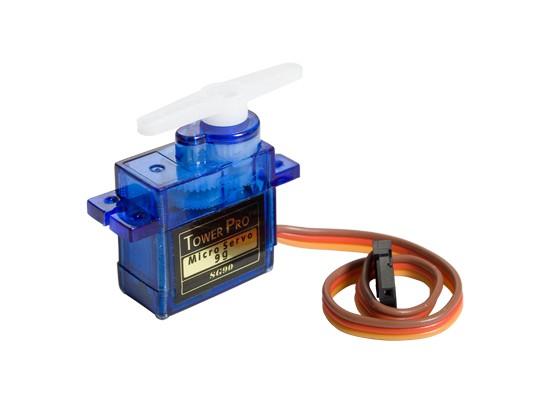
Servo Motor
A servo motor is an electric device used for precise control of angular rotation. It is used in applications that demand precise control over motion, like in the case of control of robotic arm.
The rotation angle of the servo motor is controlled by applying a PWM signal to it.
By varying the width of the PWM signal, we can change the rotation angle and direction of the motor.
For more information about Servo Motor and how to use it, refer the topic Servo Motor in the sensors and modules section.
Interfacing Diagram
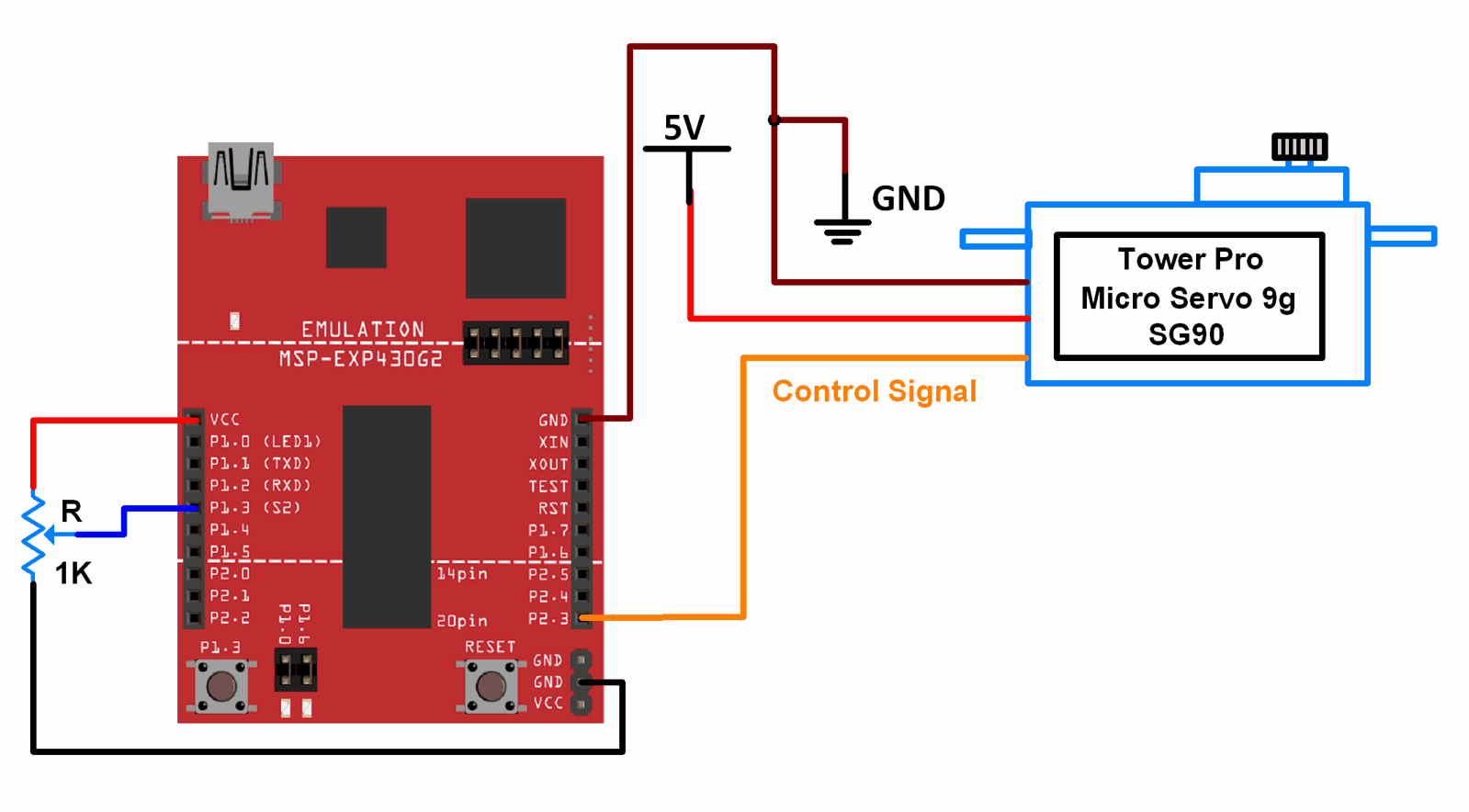 Interfacing Servo Motor With MSP-EXP430G2 TI Launchpad
Example
Controlling position of servo motor using a potentiometer.
Here, we will be using the Servo library that comes along with the Energia IDE.
There are two examples in this library. We will be using those two examples.
To open the Knob example, go to File > Examples > Servo* > Knob
To open the Sweep example, go to File > Examples > Servo* > Sweep
* You will find the Servo examples in the Example from libraries that is below the Built-In Examples. You will have to navigate down and find it.
Note : We have changed the pin used for servo motor in the example code from pin number 9 to pin number 11. The codes given below and the interfacing diagram are given accordingly. Make the corresponding changes if you open the example directly from the library. You can also make changes to the hardware connections (connecting servo to pin 9 instead of pin 11) if you do not wish to make changes in the example sketch.
Tread Carefully : MSP-EXP430G2 TI Launchpad board has a RAM of 512 bytes which is easily filled, especially while using different libraries. There are times when you need the Serial buffer to be large enough to contain the data you want and you will have to modify the buffer size for the Serial library. While doing such things, we must ensure that the code does not utilize more than 70% RAM. This could lead to the code working in an erratic manner, working well at times and failing miserably at others.
There are times when the RAM usage may exceed 70% and the codes will work absolutely fine, and times when the code will not work even when the RAM usage is 65%.
In such cases, a bit of trial and error with the buffer size and/or variables may be necessary.
Sketch For Servo Position Control Using Potentiometer
// Controlling a servo position using a potentiometer (variable resistor)
// by Michal Rinott <http://people.interaction-ivrea.it/m.rinott>

#include <Servo.h>

Servo myservo;  // create servo object to control a servo

int potpin = A3;  // analog pin used to connect the potentiometer
int val;    // variable to read the value from the analog pin

void setup()
{
  myservo.attach(11);  // attaches the servo on pin 9 to the servo object
}

void loop()
{
  val = analogRead(potpin);       // reads the value of the potentiometer (value between 0 and 1023)
  val = map(val, 0, 1023, 0, 179); // scale it to use it with the servo (value between 0 and 180)
  myservo.write(val);              // sets the servo position according to the scaled value
  delay(15);                       // waits for the servo to get there
}
Functions Used
1. Servo myservo
- This creates an object named myservo of the class Servo.
2. myservo.attach(pin)
- This function attaches the servo variable to a pin.
- Pin is the pin number to which the servo is attached.
3. myservo.write(angle)
- This function writes a value to the servo, thus controlling the position of the shaft.
- Angle can take values between 0 to 180.
4. map(value, fromLow, fromHigh, toLow, toHigh)
- This function is used to map a number from one range to another range.
- This means that "value" having a value between "fromLow" to "fromHigh" gets converted to equivalent values in the range of "toLow" to "toHigh". "fromLow" gets mapped to "toLow" and so on.
Sketch For Sweeping The Shaft Of Servo Back And Forth
// Sweep
// by BARRAGAN <http://barraganstudio.com>
// This example code is in the public domain.


#include <Servo.h>

Servo myservo;  // create servo object to control a servo
                // a maximum of eight servo objects can be created

int pos = 0;    // variable to store the servo position

void setup()
{
  myservo.attach(11);  // attaches the servo on pin 9 to the servo object
}


void loop()
{
  for(pos = 0; pos < 180; pos += 1)  // goes from 0 degrees to 180 degrees
  {                                  // in steps of 1 degree
    myservo.write(pos);              // tell servo to go to position in variable 'pos'
    delay(15);                       // waits 15ms for the servo to reach the position
  }
  for(pos = 180; pos>=1; pos-=1)     // goes from 180 degrees to 0 degrees
  {
    myservo.write(pos);              // tell servo to go to position in variable 'pos'
    delay(15);                       // waits 15ms for the servo to reach the position
  }
}
See also

No comments:
Post a Comment